
About
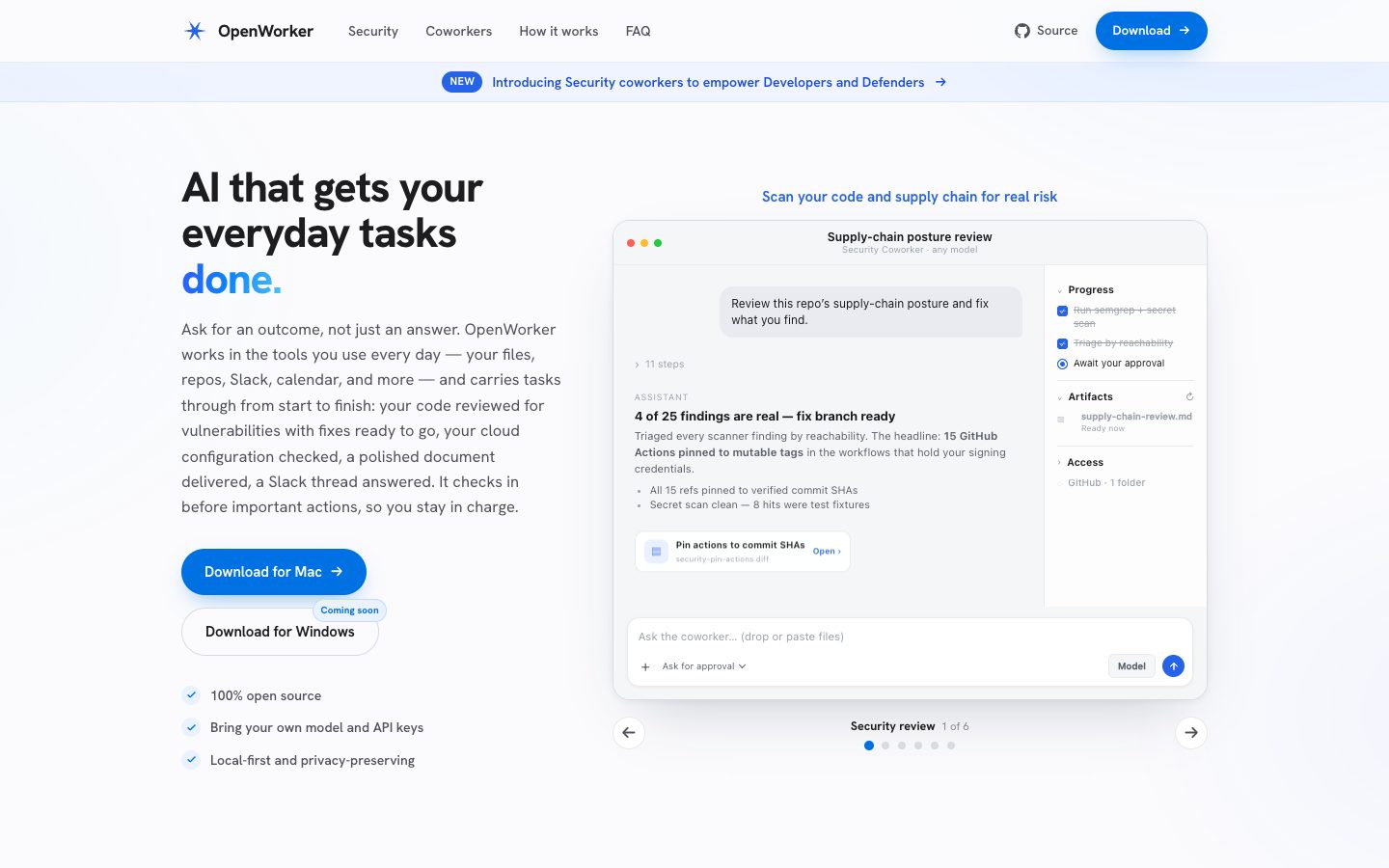
OpenWorker is an open-source desktop AI agent for carrying everyday work from a requested outcome to a finished deliverable. It runs on the user's computer, connects to tools such as files, repositories, Slack, email, calendars, CRM systems, and project tools, and can use cloud, open-weight, or locally hosted models through the user's own credentials. OpenWorker checks in before consequential actions such as sending messages, running commands, or opening pull requests. Its site also presents specialized security coworkers for code and supply-chain review, cloud posture checks, and dependency audits.
✨ Key Features
- Outcome-oriented task execution — Describe a brief, report, reply, or action and let the agent carry out the intermediate steps.
- Local-first desktop runtime — Work is performed on the user's machine, with a Mac download currently available and Windows listed as coming soon.
- Bring-your-own model — Use supported cloud providers, open-weight providers, or a local Ollama model, and switch models per task.
- Work-tool connections — Connect Slack, Outlook, Gmail, Google Calendar, Notion, HubSpot, GitHub, Google Drive, Jira, Linear, Asana, Dropbox, Box, Attio, and other tools shown by the product.
- Approval-gated actions — Review consequential operations before messages are sent, commands run, or pull requests are opened.
- Background triggers — Start work from Slack mentions, incoming email, or a schedule and return a result in chat, Slack, or a finished file.
- Security coworkers — Scan code and supply chains, triage reachable risks, review Terraform/cloud posture in read-only mode, and propose fixes as pull requests.
- Custom coworkers — Describe a job in plain language and package a reusable coworker for others.
- Artifacts and deliverables — Produce Markdown, PDF, images, reports, diffs, and other task outputs while preserving a reviewable workflow.
- Local credential handling — The FAQ says passwords and tokens are kept in the app's local secret store; an optional account brokers some OAuth connections.
💳 Pricing
- OpenWorker app — Free and open source according to the official site.
- Model usage — No model subscription fee is charged by OpenWorker for the open-source app; users bring their own API keys and pay supported model providers directly, or run a local model with Ollama.
- Optional account — A free OpenWorker account can add one-click connections for tools such as Slack where vendor restrictions require a sign-in flow. The official site does not list a paid OpenWorker subscription.
Model, hosting, provider, and third-party integration costs are separate from the OpenWorker app. Users should review the repository, permissions, local storage behavior, and each model provider's data policy before connecting sensitive workspaces.
⚖️ Alternatives Compared
| Product | Best for | Public pricing | Key difference |
|---|---|---|---|
| OpenWorker | Local-first, approval-gated desktop task automation | Free and open source; model costs separate | Runs on the user's machine, supports the user's model keys, and returns reviewed deliverables across connected work tools |
| OpenInterpreter | Local terminal and desktop computer-use agents | Core software free; provider costs separate | Stronger emphasis on an interpreter that executes code and operates a computer through natural language |
| OpenClaw | Self-hosted assistant gateway across channels | Open source; model and hosting costs separate | Centers on a gateway, channels, skills, and persistent assistant sessions rather than a desktop coworker workflow |
| Claude Code | Agentic software development in a terminal | Usage or subscription depends on Anthropic plan | Focuses primarily on coding and repository workflows within Anthropic's model ecosystem |
🎯 Use Cases
- Security review: Scan repositories and dependencies, triage real risk, and prepare a fix branch for review.
- Cloud posture review: Inspect Terraform and live AWS configuration read-only, then draft infrastructure changes as a pull request.
- Incident response: Read alerts and runbooks, prepare an incident timeline, and hold a Slack response for approval.
- Sales preparation: Gather CRM history and customer conversations, then produce a renewal brief and follow-up draft.
- Executive assistance: Reconcile calendar conflicts, prepare notes, and request approval before sending changes.
- Recurring reporting: Trigger a scheduled task, pull numbers from connected tools, and deliver a report before a meeting.
- Document production: Turn a brief and local files into a polished Markdown, PDF, image, or other deliverable.
- Custom team operations: Package a repeatable coworker for a team's specific workflow and tool set.
OpenWorker can access source code, files, communications, calendars, cloud configuration, CRM records, and model-provider credentials. Grant the smallest practical scope, inspect proposed actions, and verify generated changes before merging, sending, or applying them.
OpenWorker Website Overview
OpenWorker has an Ahrefs Domain Rating of 31 and falls within Cloudflare Radar's global top 200,000 popularity bucket. This bucket is unordered, and neither signal represents actual visits.
- Domain rating
- 31
- Popularity position
- Top 200,000
- Primary category
- Unavailable
- Ranked locations
- 0
Ahrefs
Cloudflare Radar
Cloudflare Radar
Cloudflare Radar
Website categories
No category data is available yet.
Top locations by rank
No location ranking is available yet.
Data coverage
Free popularity and domain-authority signals only; no estimated visits or engagement metrics are shown.
Sources: Domain Rating by Ahrefs · Cloudflare Radar · Oct 18, 2026. Cloudflare Radar data is licensed under CC BY-NC 4.0.
Similar tools
WorkClaw
FreeWorkClaw is a collaborative AI-coworker platform built on OpenClaw where teams deploy custom AI agents that work 24/7 across Slack, email, and 3,000+ apps;
OpenInterpreter
FreeProvider-agnostic AI agent for terminal coding and desktop work across files, apps, browsers, documents, and spreadsheets
OpenClaw
FreeSelf-hosted AI assistant and gateway connected to chat channels and tools
Browse.sh
FreeOpen catalog and CLI for browser automation skills, browser primitives, debugging, and cloud sessions
Allyhub
FreemiumAI agents for browsing, research, analysis, reporting, and recurring workflows
CrewAI
FreemiumOpen platform for building, deploying, and scaling multi-agent AI systems